




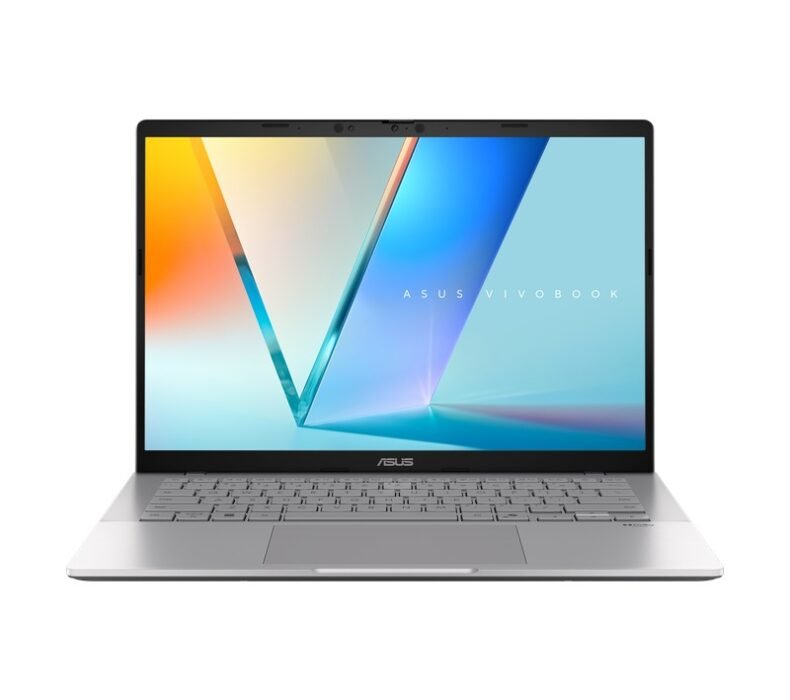
The ASUS VivoBook 15 X1504Va is the best budget laptop under ฿18,000 for students and remote workers in Thailand. You get a 13th Gen Intel Core i5, 16GB of RAM, and a solid IPS panel at a price where most competitors still ship 8GB. If you’re studying at CMU or working from a co-working space in Chiang Mai, this is where to start.
| Processor | Intel Core i5-1335U (13th Gen, 10 cores) |
| RAM | 16GB DDR4-3200 (soldered) |
| Storage | 512GB PCIe SSD (upgradable) |
| Display | 15.6″ FHD IPS, 60Hz, 250 nits |
| Graphics | Intel Iris Xe (integrated) |
| Battery | 42Wh (~5–7 hrs real-world) |
| Weight | 1.73kg |
Design and Build Quality
At 1.73kg, the VivoBook 15 is manageable for daily bag carry. The plastic chassis is not premium — ASUS is honest about that at this price — but it feels solid enough. No creaking when you pick it up by a corner, no flexing on the keyboard deck. The silver finish attracts fingerprints quickly. If you’re moving between lectures or co-working spaces every day, you will notice the smears by end of week.
Ports are practical: two USB-A 3.2, one USB-C (USB 3.2 Gen 1, not Thunderbolt), HDMI 1.4, and a full-size SD card reader. For Thailand’s office environments — where projectors, external monitors, and card readers are still common — this port layout matters. The USB-C charges the laptop and can output display, but charges slowly and won’t fast-charge from a typical phone charger. Bring the included adapter to any all-day session.
The keyboard is full-size with a numpad. Key travel is reasonable for a laptop at this size. There is no keyboard backlight on the base configuration — check this before buying if you work in dim environments like Thai coffee shops in the evening. The trackpad is smooth and responsive.
Performance
The Core i5-1335U runs at up to 4.6GHz across its performance cores. For the work these laptops get used for — documents, spreadsheets, browser-heavy research, light photo editing, Zoom calls — the CPU handles it cleanly. Open 15 Chrome tabs, run a Zoom meeting, have Notion and Figma running simultaneously: no stuttering, no fan spin-up. This is where the 16GB of RAM earns its keep. Most competitors at this price ship 8GB and you feel the bottleneck immediately once the browser cache fills up.
Sustained performance under load is moderate. The 1335U is a U-series chip designed for thin-and-light laptops, which means it throttles under extended CPU pressure. Running a long Python script or exporting video will slow down after a few minutes as the cooling system hits its ceiling. This is not a laptop for video rendering or running local AI models. For compiling code or running data analysis in Jupyter, it is fast enough to not be frustrating — but gaming laptops with discrete GPUs will outperform it significantly under sustained load.
The 512GB SSD is PCIe 3.0. File transfers and app launches are fast. Opening large Excel files or VS Code projects feels snappy. The drive is upgradable — one M.2 slot is accessible after removing the back panel — making this a good long-term investment if you anticipate needing more storage by year two.
Display
The 15.6″ IPS panel covers around 45% NTSC colour gamut, standard at this price. Text is sharp, viewing angles are wide enough for showing your screen to a colleague beside you, and the matte coating handles office fluorescent lighting without glare. At 250 nits, outdoor use is borderline — you can work in a shaded café terrace, but direct sunlight makes the screen hard to read. Most Thai office and university environments are indoor or shaded, so this is not a daily problem for most people.
The 60Hz refresh rate is fine for productivity work. For anything that is not gaming — documents, video calls, browser-based work — you will not notice the refresh rate. Colour accuracy is adequate for reference images and casual photo sorting, not suitable for colour-critical design work without external calibration.
Thailand Price and Warranty
On Lazada Thailand, the VivoBook 15 X1504Va (Core i5, 16GB, 512GB) is available at approximately ฿15,990–฿17,990 depending on the seller. ASUS Thailand official store on Lazada carries units with full 2-year ASUS Thailand warranty (ประกันศูนย์ไทย) including a pick-up service in Bangkok and Chiang Mai. This is worth paying slightly more for over third-party sellers, who may carry grey-market units that void the warranty if anything fails.
Comparable 13th Gen Core i5 laptops with 8GB RAM sell for similar or higher prices. At 16GB, the VivoBook is the better value at this price band for memory-intensive work. The international price — around $530–$560 USD — converts to roughly ฿18,000–฿19,000 at current exchange rates, so Thai pricing is competitive. Importing offers no meaningful saving after import duty and loss of Thai warranty.
Power supply is 90W, 100–240V compatible. The adapter works on Thai 220V power without modification. ASUS service centres operate in Bangkok (Central World, Power Mall Bangkapi) and Chiang Mai. Turnaround on warranty claims is typically 7–10 business days in Bangkok. JIB Computer, Banana IT, and the ASUS Thailand Official Store on Lazada LazMall are the most reliable sources for units with documented Thai warranty — their listings explicitly state “ประกัน 2 ปีศูนย์ ASUS ไทย” and handle warranty claims directly without requiring you to go through a third-party distributor.
- 16GB RAM standard — rare at this price point in Thailand
- 13th Gen Intel Core i5 handles multitasking and office work cleanly
- 512GB PCIe SSD is fast and user-upgradable
- 1.73kg is manageable for daily carry between campus or co-working spaces
- Full 2-year ASUS Thailand warranty from official Lazada store
- 250 nits display — borderline usable outdoors, fine indoors
- No keyboard backlight on base configuration
- Battery life is 5–7 hours real-world — bring the charger for full-day sessions
Who Should Buy the VivoBook 15 X1504Va
Buy this if you are a university student or early-career professional in Thailand who needs a reliable daily driver for documents, coding, design apps, and video calls — and wants 16GB of RAM without spending ฿25,000. The performance ceiling for office and study tasks is not an issue here. The ASUS Thailand warranty gives you two years of covered repairs, which matters when your laptop is your primary tool.
Skip this if you need to run GPU-accelerated workloads, edit 4K video, or play modern games. The integrated Iris Xe graphics are not built for any of that. For gaming and GPU work at a similar price, look at entry-level gaming laptops with discrete GPUs — the Acer Nitro series or ASUS TUF Gaming line start around ฿19,000–฿22,000 and include an RTX 3050. Check the best laptops in Thailand 2026 roundup for a side-by-side comparison of current options.
Skip this too if you work primarily outdoors in direct sunlight. The 250-nit display is manageable in shaded outdoor areas but not in direct sun. For outdoor-heavy use, look for laptops specifying 300+ nits peak brightness.
Verdict
For under ฿18,000, the ASUS VivoBook 15 X1504Va is the most practical choice for students and remote workers who need 16GB of RAM and a reliable 13th Gen CPU without overspending. It is not a gaming machine and the display struggles in direct sunlight, but for daily study and work use in Thailand it delivers. Buy from the ASUS Thailand official store on Lazada for the full warranty.

Karn is ElectroThailand's lead gaming and computing editor. He covers gaming PCs, GPUs, CPUs, gaming peripherals, and everything in the PC building and esports space. With years of competitive gaming experience and a deep understanding of hardware benchmarks, Karn helps Thai gamers build smarter rigs without overspending.