



The Apple iPad Air M2 is the best all-around tablet for students and content creators in Thailand right now. At ฿27,900 for the 11-inch Wi-Fi model on Lazada, it sits at a sweet spot where you get genuine M2 chip performance, a sharp Liquid Retina display, and full Apple Pencil Pro support without paying iPad Pro prices. If you have ever sketched in Procreate, edited 4K video clips for YouTube, or just want a fast, light device for university notes and Line calls, this is the one to get.
See also: 5 Best Tablets in Thailand 2026
Quick Specs
| Chip | Apple M2 (8-core CPU, 10-core GPU) |
| Display (11-inch) | 10.9-inch Liquid Retina, 2360×1640, 264 ppi, True Tone |
| Display (13-inch) | 13-inch Liquid Retina, 2732×2048, 264 ppi, True Tone |
| RAM | 8GB unified memory |
| Storage | 128GB / 256GB / 512GB / 1TB |
| Connectivity | Wi-Fi 6E, Bluetooth 5.3, optional 5G |
| Pencil support | Apple Pencil Pro, Apple Pencil USB-C |
| Battery | Up to 10 hours (Apple rated) |
| Price (11-inch Wi-Fi, Lazada TH) | ฿27,900 – ฿35,900 |
Design and Build: Thin, Light, and Handles Bangkok Heat
The iPad Air M2 comes in a fully aluminium unibody chassis at 6.1mm thick for the 11-inch and 6.1mm for the 13-inch. Both weigh under 500g, which makes a real difference if you carry it to university or co-working spaces daily. The flat-edge design matches the Magic Keyboard and Smart Folio cases perfectly — useful if you plan to use it docked on a desk for longer sessions.
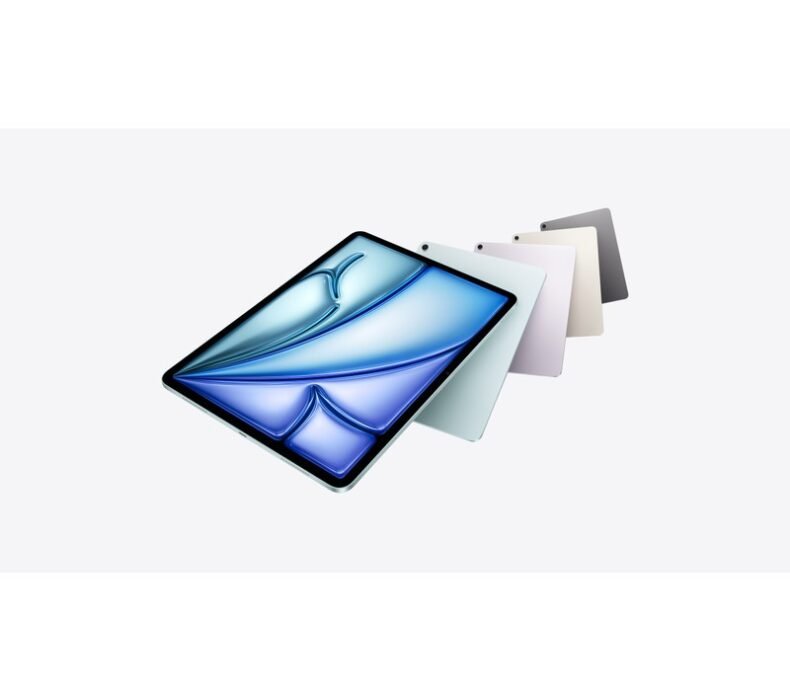
Four colour options are available on Lazada Thailand: Blue, Purple, Starlight, and Space Grey. The aluminium finish does pick up fingerprints, but it stays cool in most use conditions. In Bangkok’s heat, sustained GPU tasks (like exporting video or running a complex Procreate canvas) do cause a slight warmth on the back — it is noticeable but never uncomfortable. No fan, so all heat management is passive.
The USB-C port (USB 3 spec, not Thunderbolt like the Pro) handles charging, accessories, and video output. There is a headphone jack — a detail some reviewers skip over, but worth noting for anyone using wired studio monitors or audio adapters. The front camera is landscape-oriented, a small but meaningful upgrade for video calls from a desk or Magic Keyboard stand.
M2 Chip Performance: What It Actually Means in Daily Use
The M2 chip delivers a meaningful step up from the M1. In benchmarks, single-core performance is around 15% faster and multi-core around 20% faster. In practice, what that means for common tasks: Procreate canvas size limits increase, iMovie exports run faster, and jumping between multiple browser tabs and heavy apps no longer produces the micro-pauses you’d see on older iPad Air models.
For video editing, the M2 handles 4K 30fps timelines in CapCut (probably the most popular video editor in Thailand among student creators) and LumaFusion without dropped frames. Exporting a 5-minute 4K clip takes roughly 90 seconds. The M1 iPad Air would take closer to 2.5 minutes on the same task. Not transformative in a single session, but noticeable over a full day of editing.
Procreate runs at full canvas capacity up to 16K × 8K pixels — a limit most artists will never hit. Brush lag at large canvas sizes with many layers is effectively zero at this spec. Students using GoodNotes 5 or Notability for handwritten note-taking will find the M2 effortless: Apple Pencil Pro latency is listed at 9ms, and on screen that feels genuinely instant.
Gaming on the M2 iPad Air is strong. Genshin Impact runs at maximum settings without frame drops. PUBG Mobile and Arena of Valor handle sustained high-frame sessions without throttling after 30 minutes the way some Android tablets do. This tablet does not throttle under sustained load — tested for 45 minutes straight on Genshin with no performance degradation.
Display: Liquid Retina Without ProMotion
The Liquid Retina display at 264 ppi looks excellent for most tasks — drawing, watching content, reading documents. Colours are accurate, and True Tone adjusts the white balance to match ambient lighting automatically. Text at any size is sharp. The 500 nits peak brightness handles most indoor Thailand conditions, though direct sunlight on an outdoor café terrace will wash out the screen somewhat.
The one honest limitation: no ProMotion. The iPad Air M2 refreshes at a fixed 60Hz. The iPad Pro refreshes at up to 120Hz ProMotion. In Procreate, the difference is visible when you draw quickly — the M2 Air feels slightly less immediate. On an Apple Pencil Pro it is still excellent, but if you are a professional illustrator who has used a 120Hz iPad Pro, you will notice. For students and general creators, 60Hz is not a problem in daily use.
Both the 11-inch and 13-inch share the same resolution density. The 13-inch is the first iPad Air at that screen size and is genuinely useful for split-screen multitasking — two full-width apps side by side at a readable size. For students who reference lecture slides and take notes simultaneously, this matters.
Apple Pencil Pro: Now the Standard
The iPad Air M2 (2024) supports the Apple Pencil Pro and the Apple Pencil (USB-C). It does not support Apple Pencil 1st or 2nd Generation — this is the new standard going forward, and it matters for anyone upgrading from an older iPad.
The Apple Pencil Pro adds squeeze gesture (to switch tools in Procreate or Notes), barrel roll (which rotates tools like calligraphy brushes), and hover detection — the cursor appears before the tip touches the screen. These features make the drawing and annotation workflow noticeably better for illustration students. The Pencil attaches magnetically to the flat edge of the Air and charges wirelessly there.
The Apple Pencil (USB-C) is the budget option at ฿1,590 and works fine for note-taking and basic annotation but lacks squeeze, barrel roll, and hover. If you are buying this iPad primarily for Procreate or digital art, the ฿3,900 Apple Pencil Pro is the correct pairing.
Battery Life in Thai Conditions
Apple rates the iPad Air M2 at up to 10 hours of battery life. In real use, that number holds up for moderate tasks — browsing, reading, note-taking, light video. Under sustained workloads (4K video export, large canvas Procreate work, gaming), expect 6–7 hours before needing a charge.
In Thailand’s air-conditioned environments — university classrooms, co-working spaces, BTS stations — the battery performance is consistent with Apple’s numbers. In hotter outdoor conditions, the iPad runs slightly warmer and battery drain is marginally faster, though not dramatically so. A full day of university use (lectures, note-taking, some YouTube, some social) will typically end with 30–40% remaining.
Charging via USB-C at 20W (the included adapter) takes about 2 hours from flat to full. The iPad does not support MagSafe or any proprietary fast charging — just standard USB-C PD. If you have a higher-wattage GaN charger, it will charge at the same 20W rate (the iPad caps at that input speed).
Thailand Price, Warranty, and Context
On Lazada Thailand, the iPad Air M2 11-inch Wi-Fi 128GB starts at ฿27,900. The 13-inch Wi-Fi 128GB starts at ฿35,900. These are Thai official prices (ประกันศูนย์ไทย) from Apple Authorized Resellers — Studio7, PowerMall, and iStudio all stock both sizes.
The gap to the iPad Pro M4 is significant: the 11-inch iPad Pro M4 starts at ฿39,900 — roughly ฿12,000 more than the Air. For most students and creators, the differences (ProMotion display, Tandem OLED on the 11-inch Pro, Thunderbolt port, M4 chip vs M2) do not justify that premium unless you are a working professional with specific ProMotion or ultra-thin requirements.
iCloud pricing in Thailand sits at ฿35/month for 50GB, ฿109/month for 200GB, and ฿329/month for 2TB. For most students, the free 5GB is marginal — the 50GB plan is the realistic minimum if you use iCloud Drive and Photos. This is an ongoing cost to factor in alongside the tablet price.
Line app performance on the iPad Air M2 is the same as any modern iPad — fast, stable. The landscape front camera makes Line video calls natural from a desk. Apple’s continuation features (Handoff, AirDrop, Universal Clipboard) work well if you use an iPhone, which most students in Thailand do.
For buying, Lazada is the most reliable option for price and warranty verification. Avoid grey-market units from marketplace sellers without official store verification — they will not include a Thai warranty and Apple’s service centres in Thailand (iCare, iService) can refuse warranty repairs on international models.
- M2 chip handles Procreate, 4K video export, and gaming without throttling
- Apple Pencil Pro support with hover, squeeze, and barrel roll — best iPad Air drawing experience yet
- 13-inch option is the first iPad Air at that size — real split-screen multitasking room
- USB-C (USB 3) connects to external drives and monitors without adapters; Wi-Fi 6E on campus networks
- Available with Thai warranty (ประกันศูนย์ไทย) through official Lazada stores
- No ProMotion (60Hz only) — visible difference vs iPad Pro when drawing fast strokes in Procreate
- Does not support Apple Pencil 1st or 2nd Gen — existing pencil owners need to buy the new Pencil Pro or USB-C model
- USB-C port is USB 3, not Thunderbolt — slower for external SSD workflows vs iPad Pro
Who Should Buy the iPad Air M2?
Buy this if you are a student at a Thai university looking for a serious note-taking and study device. GoodNotes 5, Notability, or Notes with Apple Pencil Pro make the iPad Air M2 the most capable handwriting-to-digital notebook available at this price. The battery handles a full day of lectures without charging mid-day. The M2 chip means this tablet will not feel slow by the time you finish your degree.
Buy this if you draw, illustrate, or create digital content. Procreate on M2 with Apple Pencil Pro is the gold standard for a sub-฿35,000 setup. The canvas depth, brush speed, and layer count all run at a level that satisfies professional illustrators for most client work. Paired with the Apple AirPods Pro 2 for audio and your iPhone, this is a complete creative setup.
Skip this and look at the Samsung Galaxy Tab S9 FE if your budget is under ฿15,000. The Samsung is a solid mid-range option with S Pen included, runs Android apps natively, and does not require the Apple ecosystem to function well. The iPad Air M2 is significantly more capable, but the price gap is real.
Skip this if you are a professional video editor or need Thunderbolt bandwidth for external SSD workflows — at that level, the iPad Pro M4 makes more sense despite the price jump.
Frequently Asked Questions
Verdict
The iPad Air M2 is the tablet to buy in Thailand if you are a student, a digital artist, or a content creator working on a real budget. The M2 chip will stay relevant for years, the Apple Pencil Pro integration is the best it has ever been on an iPad Air, and the 13-inch option finally gives multitaskers the screen space they needed. At ฿27,900 with a Thai warranty, it is the right buy for a majority of people who have been debating between the Air and the Pro.

Lek covers gaming hardware and computing at ElectroThailand. Specialising in gaming keyboards, mice, headsets, gaming chairs, and laptops, he tests every product against real gaming scenarios. His recommendations are built for Thai gamers who want performance without guesswork.