





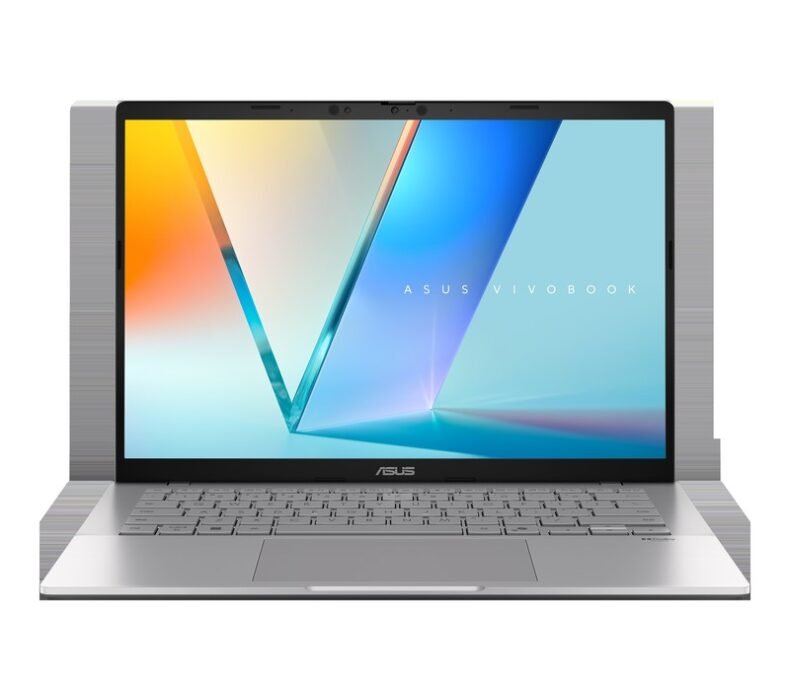
The best laptop under ฿15,000 in Thailand right now is the ASUS VivoBook 15 X1504Za — Intel Core i5-1235U, 512GB SSD, and a reliable display at a price that leaves money in your pocket. If you want AMD and a slightly lower entry price, the Lenovo IdeaPad 1 with Ryzen 5 5500U at ฿11,990 is the alternative worth considering. Both are available on Lazada Thailand with Thai warranty. The ASUS VivoBook Go 15 is the budget pick if you need to stay under ฿12,000 and can accept older generation specs.
Laptops Under ฿15,000 Thailand 2026: Comparison
| Laptop | Price | CPU | RAM / SSD | Best for |
|---|---|---|---|---|
| ASUS VivoBook 15 X1504Za | ฿13,490 | Core i5-1235U | 8GB / 512GB | Remote work, students |
| Lenovo IdeaPad 1 15ALC7 | ฿11,990 | Ryzen 5 5500U | 8GB / 512GB | AMD fans, everyday use |
| Acer Aspire 3 A315 | ฿10,490 | Ryzen 5 5625U | 8GB / 512GB | Tightest budget, good value |
| HP 15s-eq | ฿12,990 | Ryzen 5 5625U | 8GB / 512GB | Brand loyalty, office work |
| ASUS VivoBook Go 15 E1504FA | ฿10,990 | Ryzen 5 7520U | 8GB / 512GB | Battery life, portability |
What We Looked For
- Available on Lazada Thailand with Thai warranty (ประกันศูนย์ไทย) — at least 1 year
- Priced at or under ฿15,000 in April 2026 (base configuration)
- 8GB RAM minimum — anything less is inadequate for daily Thai use with Chrome and LINE open
- 512GB SSD minimum — Thai buyers regularly install Thai fonts, apps, and LINE content that fill drives quickly
- 15.6″ FHD screen — the standard for Thai university and office environments
- Adequate cooling for Thailand’s 30°C+ ambient temperatures
#1 ASUS VivoBook 15 X1504Za — Top Pick Under ฿15,000
Best for: university students, remote workers, and anyone who wants the most reliable Intel build in this price range
฿13,490 on Lazada
The Intel Core i5-1235U (12th gen, 10 cores) in the X1504Za gives you genuine multitasking headroom at this price. Open Chrome with 20 tabs, LINE Desktop, Microsoft Teams, and a Google Doc simultaneously — it holds without throttling in a way that previous-gen i3 machines at this price simply didn’t. The 512GB SSD is NVMe (not SATA), which matters for boot and app load times.
Build quality is better than Acer’s entry-level at this price point. The keyboard deck has minimal flex, the hinge is appropriately stiff, and the 39Wh battery consistently gives 6–7 hours of real-world use. For a Thai student who carries this to university and back on the BTS daily, the 1.7kg weight is manageable. Thai warranty through ASUS Thailand is straightforward — drop it at any ASUS Service Center, which are well-distributed in Bangkok and major cities.
- Best multitasking performance in this price range
- NVMe SSD — faster than competitors at this price
- Solid build quality, minimal keyboard flex
- ASUS Thailand service centers widely available
- Display brightness is adequate but not excellent (250 nits)
- Fan gets loud under heavy load in Thailand heat
- Limited upgradeability — RAM is soldered
📋 CPU: Intel Core i5-1235U (10C/12T) | RAM: 8GB DDR4 | Storage: 512GB NVMe SSD | Display: 15.6″ FHD IPS | Battery: 39Wh | Weight: 1.7kg | Warranty: 1 year Thai
#2 Lenovo IdeaPad 1 15ALC7 — Best AMD Option
Best for: everyday computing and study tasks, anyone who prefers AMD performance-per-baht
฿11,990 on Lazada
At ฿11,990, the Lenovo IdeaPad 1 with Ryzen 5 5500U gives you six cores for under ฿12,000. The 5500U is a few generations old now, but it remains competitive for document work, web browsing, video calls, and light content creation. Lenovo’s build here is adequate but not impressive — the plastic chassis has more flex than the ASUS, and the 38Wh battery gives 5–6 hours in practice.
Where it wins is the price gap: ฿1,500 less than the ASUS VivoBook 15 for comparable everyday performance. If your use case is student assignments, LINE, and Zoom, the real-world difference between these two is small. If you occasionally run Python scripts or compile code, the six-core Ryzen starts to pull ahead of dual-core alternatives. Lenovo warranty in Thailand is through authorized service centers — adequate coverage for the price.
- 6-core Ryzen 5 at a competitive price
- ฿11,990 — most affordable full-spec option
- Consistent Lenovo build quality for the price
- Plastic build — more flex than ASUS
- Display is 60Hz TN on some variants — check spec before buying
- Ryzen 5500U is older generation (2020 release)
📋 CPU: AMD Ryzen 5 5500U (6C/12T) | RAM: 8GB DDR4 | Storage: 512GB SSD | Display: 15.6″ FHD | Battery: 38Wh | Weight: 1.65kg | Warranty: 1 year Thai
#3 Acer Aspire 3 A315 — Best Under ฿11,000
Best for: anyone on the tightest budget who still needs a complete, reliable machine for study or light work
฿10,490 on Lazada
Ryzen 5 5625U at ฿10,490 is a legitimate value pick. The 5625U is a better chip than its generation name suggests — 6 cores, decent integrated graphics (Radeon RX Vega 7), and efficient enough to run 6–7 hours on a charge. Acer’s build at this price is basic but functional: thin bezels relative to its price class, reasonable keyboard, acceptable trackpad.
The trade-off is Acer’s service network in Thailand, which is thinner than ASUS’s. For Bangkok users, getting a warranty repair is manageable. For users in provinces, response times can be longer. If you are studying in Chiang Mai or Khon Kaen and worry about service access, the ASUS VivoBook — even at higher price — gives more peace of mind on the warranty side.
- ฿10,490 — best price-to-spec ratio in this list
- Ryzen 5 5625U with Radeon Vega 7 integrated graphics
- Adequate for study, work, and light media
- Acer service centers less accessible outside Bangkok
- Build quality is functional but feels cheaper
- SATA SSD on some variants (slower than NVMe)
📋 CPU: AMD Ryzen 5 5625U (6C/12T) | RAM: 8GB DDR4 | Storage: 512GB SSD | Display: 15.6″ FHD | Battery: 48Wh | Weight: 1.9kg | Warranty: 1 year Thai
#4 HP 15s-eq — Most Recognisable Brand in Thailand
Best for: buyers who prioritise HP’s brand recognition and service reliability in Thailand
฿12,990 on Lazada
HP is one of the most-purchased laptop brands in Thailand, partly because of its wide presence in IT malls like Pantip and strong corporate relationships. The 15s-eq with Ryzen 5 5625U at ฿12,990 is not the spec leader in this comparison, but HP’s warranty service in Thailand is extensive — HP Service Centers are present in most major malls and cover province-level repairs.
The display on the 15s-eq is a genuine bright spot: 250 nit IPS panel with decent colour coverage for a ฿12,990 machine. Battery life is consistent at 6–7 hours, which beats the Lenovo in this comparison. If you are buying a laptop for a family member who is not technically inclined and might need warranty help anywhere in Thailand — HP’s service network is the most accessible of the five options here.
- HP service centers widely available across Thailand
- Better display brightness than most at this price
- Consistent 6–7 hour battery life
- Pantip and Power Mall availability for in-person purchase
- ฿12,990 — more expensive than Lenovo for similar spec
- Keyboard feedback is slightly shallow
- Heavier than alternatives at this price (1.9kg)
📋 CPU: AMD Ryzen 5 5625U (6C/12T) | RAM: 8GB DDR4 | Storage: 512GB SSD | Display: 15.6″ FHD IPS | Battery: 41Wh | Weight: 1.9kg | Warranty: 1 year Thai
#5 ASUS VivoBook Go 15 E1504FA — Best Battery Life Under ฿12,000
Best for: students or commuters who prioritise long battery life and portability over peak performance
฿10,990 on Lazada
The VivoBook Go 15 uses AMD Ryzen 5 7520U — a newer chip than the 5500U/5625U found in competing laptops at this price, and significantly more power-efficient. The practical result is 8–9 hours of real-world battery life on a single charge. If you are a student who spends time in lecture halls and libraries without easy power access, or a commuter who uses the laptop on the go throughout the day, this is the machine that keeps working when others don’t.
The trade-off: peak performance is lower than the ASUS VivoBook 15 X1504Za. The 7520U is designed for efficiency, not raw compute. For document work, web browsing, and everyday Thai student use cases, the difference is invisible. For anything CPU-intensive — running multiple tabs with video calls, compiling code, light video editing — you will notice the ceiling sooner than with the i5-1235U build.
- 8–9 hours battery life — best in this comparison
- Ryzen 5 7520U — newer generation than most competitors
- Lighter body (1.63kg) — easiest to carry
- ASUS Thai warranty and service network
- Lower peak performance than X1504Za
- Display is basic (TN on some variants)
- Port selection is limited (2x USB-A, 1x USB-C, no HDMI on some)
📋 CPU: AMD Ryzen 5 7520U (4C/8T) | RAM: 8GB LPDDR5 | Storage: 512GB SSD | Display: 15.6″ FHD | Battery: 42Wh | Weight: 1.63kg | Warranty: 1 year Thai
How to Choose: Which Laptop Under ฿15,000 Is Right for You?
Are you a university student in Thailand?
The ASUS VivoBook 15 X1504Za at ฿13,490 is the most straightforward recommendation. Thai universities typically require students to run Microsoft Office, LINE, Zoom, and occasionally Python or SPSS. The Core i5-1235U handles all of this without the thermal struggles that older-gen dual-core Intel machines have in Thai ambient temperatures. ASUS’s service centers in Bangkok and major university cities (Chiang Mai, Khon Kaen, Hat Yai) mean warranty claims are manageable. Our full laptops roundup for Thailand 2026 includes additional options above the ฿15,000 mark if you want to see how these compare to premium builds.
Do you work from home or in a co-working space in Thailand?
HP 15s or ASUS VivoBook 15. For remote work specifically: the HP’s display brightness makes it easier to use near windows in Bangkok’s bright daytime light. The ASUS gives better CPU headroom for heavy multi-tab work. Both come with Thai warranty from widely-accessible service centers. Skip the Lenovo and Acer for this use case — their service networks outside Bangkok are thinner, and remote workers who relocate across Thailand value that flexibility.
Is battery life the most important factor?
ASUS VivoBook Go 15 E1504FA. The Ryzen 5 7520U is built for efficiency over raw performance, and the 8–9 hours of real-world battery means it survives a full day of lectures, co-working, and commuting without needing a power brick. At ฿10,990 with ASUS Thai warranty, it is the standout option for anyone whose daily routine keeps them away from outlets for 6+ hours.
Is ฿10,000–฿11,000 the hard limit?
Acer Aspire 3 at ฿10,490. The Ryzen 5 5625U with Radeon Vega 7 at this price is legitimate value. It handles everyday Thai use cases without issue. The trade-off is Acer’s thinner service coverage outside Bangkok and a build that feels less premium. If you are in Bangkok and comfortable managing the warranty yourself, it is the strongest spec-per-baht option in this range. If you are outside Bangkok and worry about service access — the VivoBook Go 15 at ฿10,990 adds ASUS’s better service network for ฿500 more.
Frequently Asked Questions
The Verdict: Best Laptop Under ฿15,000 in Thailand 2026
For most buyers in Thailand, the ASUS VivoBook 15 X1504Za at ฿13,490 is the right call. The Core i5-1235U, NVMe SSD, and ASUS’s Thai service network are the combination that makes most sense for students and remote workers. If the budget caps at ฿12,000 and AMD is your preference, the Lenovo IdeaPad 1 at ฿11,990 delivers competitive six-core performance at a lower price. For maximum battery life, the VivoBook Go 15 at ฿10,990 is the standout option.

Karn is ElectroThailand's lead gaming and computing editor. He covers gaming PCs, GPUs, CPUs, gaming peripherals, and everything in the PC building and esports space. With years of competitive gaming experience and a deep understanding of hardware benchmarks, Karn helps Thai gamers build smarter rigs without overspending.