



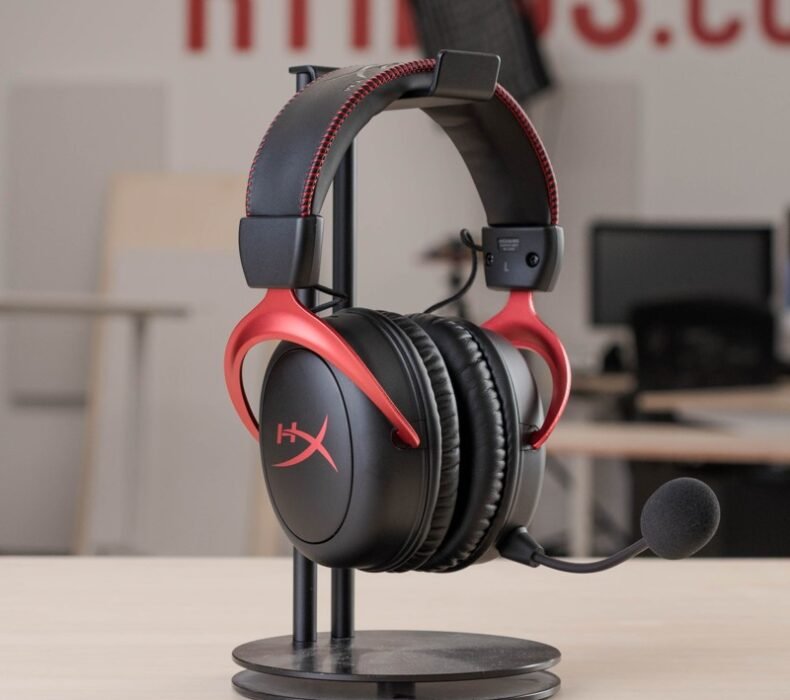
The HyperX Cloud II Wireless is the best budget wireless gaming headset under ฿4,500 in Thailand right now. At ฿3,490–฿4,490 on Lazada, it gives you genuine 7.1 virtual surround sound, a 30-hour battery, and a USB-A dongle that works with PC and PS4 out of the box. If you game at a desk in a Bangkok condo and want to cut the cable without spending ฿6,000+ on a flagship, this is the headset to buy.
| Driver Size | 53mm custom neodymium |
| Frequency Response | 15Hz–20,000Hz |
| Virtual Surround | 7.1 (USB-A dongle required) |
| Battery Life | Up to 30 hours |
| Wireless Range | 20 metres (line of sight) |
| Microphone | Detachable, noise-cancelling condenser |
| Weight | 300g |
| Compatibility | PC, PS4, PS5 (USB-A dongle) |
| Thai Price (Lazada) | ฿3,490–฿4,490 |
Build Quality and Comfort for Long Sessions
Pick up the Cloud II Wireless and the first thing you notice is that it feels more solid than its price suggests. The aluminium frame runs through the headband, the ear cups are covered in memory foam wrapped in faux leather, and the yokes actually swivel rather than creak. Nothing about the build screams budget. At 300g it’s on the heavier side for wireless headsets, but HyperX distributes the weight well across the headband padding.
For long sessions — the kind where you sit down at 9pm and look up to find it’s past midnight — the Cloud II Wireless holds up better than most headsets at this price. The memory foam ear cups conform to the shape of your ears over the first 30 minutes, and the clamping force is firm but never vice-like. On Bangkok evenings where the AC is running but the room still sits at 26–28°C, faux leather ear pads will cause some heat build-up after 2–3 hours. That’s true of every closed-back headset in this price range, not just this one.
The detachable microphone slots into the left ear cup via a proprietary connector and pops out with one hand. The flexible rubber boom lets you position it precisely. One legitimate gripe: there’s no 3.5mm jack on the headset itself. If your USB-A dongle is lost or unavailable, this headset becomes unusable. Keep the dongle safe.
Sound Quality and 7.1 Virtual Surround
The 53mm drivers are the largest in any headset at this price on Lazada Thailand, and the difference is audible. Bass in games like Valorant and ROV is punchy without overwhelming the mids. Footsteps on different surfaces in tactical shooters are easy to distinguish. At high volume, the HyperX Cloud II Wireless stays clean — it doesn’t distort where cheaper 40mm-driver headsets start to crumble.
For music and general use, the sound profile is slightly V-shaped — elevated bass and treble, slightly recessed mids. That’s intentional tuning for gaming. If you also use your headset for mixing music or listening to podcasts at a desk, the tuning can feel a touch artificial. For gaming exclusively, it works well.
The 7.1 virtual surround requires the USB-A dongle and works on PC and PS4/PS5. On PC it runs through HyperX’s NGENUITY software. Toggling it on gives you a noticeably wider soundstage — useful for tracking enemy positions in open-world games and MMOs. In fast-paced FPS titles, some players prefer to keep it off because positional audio becomes slightly less accurate when heavily processed. Both modes have their use, and you can switch with a button on the left ear cup without touching the software.
Microphone Quality on Discord and TeamSpeak
The detachable condenser mic is one of the better microphones at this price point. During Discord calls, the noise-cancelling capsule cuts HVAC noise from an air conditioner running two metres away with acceptable results — teammates won’t hear the background hum unless they’re actively listening for it. Voice clarity is strong enough for casual calls and gaming sessions.
For content creation or streaming, this mic is serviceable but not ideal. It captures a slightly nasal quality on higher voices, and there’s no on-board gain control on the headset itself. For streaming to a Thai audience on Facebook Gaming or YouTube Live, the mic works, but you’d want a dedicated condenser microphone for anything serious. As a Discord/TeamSpeak gaming mic, it does exactly what you need it to do.
On TeamSpeak in a lobby with six players, voice intelligibility stays high even at lower bitrates. Friends on the other end consistently reported clear, recognizable audio without needing to adjust receive volumes.
Battery Life: 30 Hours Claimed vs. Real Use
HyperX claims 30 hours of battery life. In real use — gaming at moderate volume with 7.1 surround active — expect 22–25 hours before the low-battery warning kicks in. That’s still exceptional for a gaming headset. Typical gaming sessions of 3–5 hours per day mean you’re charging this headset once every four to five days.
With surround sound off and volume below 70%, the figure climbs closer to 28 hours. With surround on and volume pushed, it drops to around 20. None of those numbers are bad. The SteelSeries Arctis Nova 3, the closest competitor, manages around 22 hours wireless — so the HyperX has a meaningful edge in battery longevity.
Charging is via Micro-USB rather than USB-C. That’s the most dated thing about this headset. If you’re already carrying USB-C cables everywhere for your phone, laptop, and other gear, Micro-USB is an inconvenience. Budget for a spare cable or keep one permanently attached to your desk. A full charge takes roughly 4.5 hours from flat.
USB-A Dongle vs. Bluetooth
There is no Bluetooth on the HyperX Cloud II Wireless. This is intentional. HyperX uses a 2.4GHz USB-A dongle for wireless audio, and the reasoning is latency: Bluetooth audio in gaming introduces 80–200ms of latency depending on the codec, which is noticeable in competitive play. The USB-A dongle solution typically runs under 10ms, which is low enough to feel essentially real-time.
The practical implication: this headset is for desk gaming. It will not pair to your phone or connect to a TV without a USB-A adapter. If you want a headset that pulls double duty as wireless headphones for your commute on the BTS or MRT, the Cloud II Wireless is not the right choice. That’s a different product category.
The dongle is small — about the size of a USB flash drive — and plugs directly into your PC or PS4. Wireless range reaches about 15–18 metres with walls in the way, meaning most Thai condo living rooms are fully covered from a single desk setup. In open line of sight, HyperX rates it to 20 metres.
HyperX Cloud II Wireless vs. SteelSeries Arctis Nova 3 — Thai Market Context
The SteelSeries Arctis Nova 3 is the other headset everyone at this price point in Thailand considers. We reviewed it in detail, and the short version is: the Arctis Nova 3 has better music reproduction and more modern styling, while the Cloud II Wireless wins on battery life and raw driver size. For pure gaming use, especially if you play for long sessions, the Cloud II Wireless edges ahead.
See also: SteelSeries Arctis Nova 3 Review Thailand — our full breakdown of how the Nova 3 compares across the same categories.
At current Thai Lazada prices, the Cloud II Wireless runs ฿3,490–฿4,490 and the Arctis Nova 3 runs around ฿3,990–฿4,990 depending on seller and flash sale timing. Both are within the same budget band. The Cloud II Wireless is typically cheaper, and it packs the larger drivers. If your primary use is competitive gaming on PC, the value math favours HyperX.
For a broader comparison of what’s available in Thailand across all budget levels, check out the 5 Best Gaming Headsets in Thailand 2026 roundup.
- 53mm drivers deliver noticeably fuller bass and cleaner highs than 40mm competitors at the same price
- 22–25 hours of real-world battery life beats most rivals in this price band
- 2.4GHz dongle gives sub-10ms latency — competitive gaming-ready
- Aluminium frame and memory foam construction feel more durable than the price implies
- Detachable microphone is genuinely useful for noise-cancelling Discord performance
- Micro-USB charging in 2026 is a genuine inconvenience — no USB-C
- No Bluetooth means zero portability — useless without the dongle
- Faux leather ear pads generate noticeable heat during Bangkok summer gaming sessions longer than 2 hours
Who Should Buy the HyperX Cloud II Wireless?
Buy the Cloud II Wireless if you game at a desk for 3+ hours at a stretch and want to remove the cable without spending ฿6,000 or more. The battery will comfortably outlast any reasonable session, the 7.1 surround adds genuine directional value in games where audio positioning matters, and the build quality holds up to daily use.
Skip this if you want a single headset that also works as wireless headphones away from your desk — on commutes, at cafes, or tethered to a phone. There’s no Bluetooth, no 3.5mm jack, and no mobile use case here. For a dual-purpose wireless headset with Bluetooth, look at something like the SteelSeries Arctis Nova 3 Wireless or wait for a budget with ฿6,000+ to reach the Sony WH-1000XM5. The Cloud II Wireless is a dedicated desk gaming headset, and within that scope it’s one of the best-value options in Thailand right now.
Also worth considering: if you’re a PS5 gamer primarily, check the 5 Best Console Accessories in Thailand 2026 — the Cloud II Wireless appears there alongside alternatives that work better with Sony’s 3D Audio system.
Verdict
At ฿3,490–฿4,490 on Lazada Thailand, the HyperX Cloud II Wireless is one of the strongest-value wireless gaming headsets in its price range. The 53mm drivers, 20+ hour real-world battery, and sub-10ms 2.4GHz wireless give you specs that cost significantly more from other brands. The Micro-USB charging is the one legitimate gripe, and the lack of Bluetooth means this is a desk-only device. For PC and PS4/PS5 gamers who play for long sessions and want to cut the cable, it delivers.

Lek covers gaming hardware and computing at ElectroThailand. Specialising in gaming keyboards, mice, headsets, gaming chairs, and laptops, he tests every product against real gaming scenarios. His recommendations are built for Thai gamers who want performance without guesswork.