



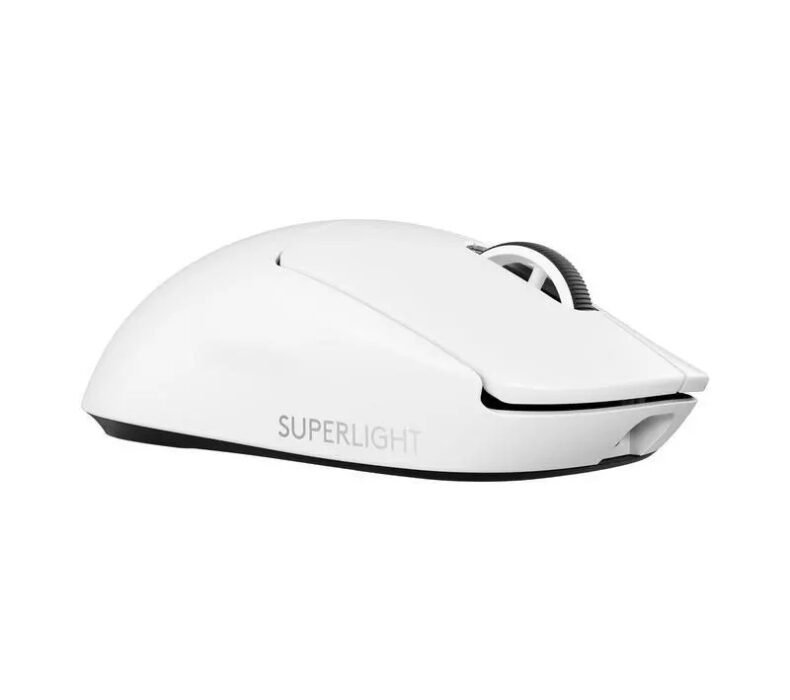
The Logitech G Pro X Superlight 2 is the best wireless gaming mouse for competitive players in Thailand. At around ฿4,490 on Lazada, you get 60g, HERO 2 sensor accuracy, and zero wireless lag — the spec sheet serious players actually care about. If you play FPS games at any level above casual, this is the benchmark.
| Weight | 60g (without cable) |
| Sensor | HERO 2 — up to 32,000 DPI, 888 IPS tracking |
| Connectivity | LIGHTSPEED wireless (2.4GHz) + USB-C wired |
| Battery | Up to 95 hours (no RGB) |
| Buttons | 5 programmable (optical switches) |
| Shape | Symmetrical right-hand |
| Feet | PTFE — zero-additive |
Design and Build Quality
60 grams. That number is the entire value proposition. Pick up the G Pro X Superlight 2 and your first reaction is that something is wrong — it is unusually light for a gaming mouse. After a week of use, you stop noticing the weight and start noticing everything you were doing to compensate for a heavier mouse: the wrist fatigue at hour three of a session, the micro-adjustments that accumulated over time. The Superlight 2 removes all of that.
Build quality is excellent. The mouse does not flex, creak, or rattle. The click feel is precise — Logitech’s optical switches have a distinct, clean actuation that does not bottom out with a mushy thud. Side buttons are well-positioned for claw and fingertip grip styles. The scroll wheel has clear tactile steps. Nothing on this mouse feels cheap.
The shape is symmetrical with a right-hand bias — the thumb rest area contours suit right-handers. For palm grip at smaller hand sizes (under 18cm hand length), it fits reasonably but is more optimised for claw and fingertip. Logitech publishes grip-guide graphics on their website. PTFE feet glide smoothly on both hard and cloth surfaces — stock feet quality is good enough that most players won’t need aftermarket replacements.
There is no RGB. No battery indicator light either — the mouse charges via USB-C and the status appears in Logitech G HUB software. The LIGHTSPEED USB receiver stores inside the mouse body (under the cover on the belly), which is useful if you travel between setups — a common scenario for LAN party attendees and university students in Bangkok and Chiang Mai who carry their peripherals. In Thailand’s climate, the lack of RGB is not a problem. The matte finish does not attract excessive sweat markings in the humidity, though after long sessions in a warm room you will need to wipe it down.
Sensor Performance
The HERO 2 sensor is flawless at every DPI setting from 100 to 25,600. No smoothing, no prediction, no angle snapping unless you enable them in G HUB. Tracking at 400 DPI for low-sensitivity FPS players is as accurate as at 1600 DPI for MOBA players. The 888 IPS tracking speed means you will not see cutout during fast swipes even at aggressive mousepad strokes.
LIGHTSPEED 2.4GHz wireless has no perceptible latency. Logitech has measured it at 1ms report rate, matching wired performance. Playing Valorant or CS2 in a Bangkok esports café, or at a setup in your room in Chiang Mai — the wireless does not introduce any disadvantage over a cable. The connection is stable even near other 2.4GHz devices, which matters if your desk also has a wireless keyboard and headset running simultaneously.
The default polling rate is 1000Hz, which is what all competitive players need. Logitech supports 2000Hz via a dedicated HERO receiver — a separate accessory — but the practical difference at 1000Hz is already imperceptible at human reaction speeds. Thai players competing at local Valorant and ROV tournaments run 1000Hz without any disadvantage versus international pro setups.
Battery life is up to 95 hours on a single charge. At two to four hours of gaming per day, that is roughly three to four weeks between charges. The USB-C cable charges quickly — an hour of charge gives you back most of the capacity. You will not be managing battery anxiety with this mouse.
Software and Customisation
Logitech G HUB handles DPI adjustment, button remapping, LIGHTSPEED receiver pairing, and polling rate selection. The software runs on Windows and macOS. It works without issues in Thailand — no region lock, full Thai Windows compatibility. DPI settings are stored onboard in the mouse itself, so you do not need G HUB running during gameplay.
Polling rate defaults to 1000Hz. For competitive Thai players who follow pro settings closely, the mouse matches what most Valorant, CSGO, and ROV professionals use internationally. Onboard memory means your DPI profile travels with the mouse — plug it into a different PC at a LAN event and your settings are already there.
Thailand Context
The G Pro X Superlight 2 is available on Lazada Thailand at approximately ฿4,490–฿5,490 depending on colour and seller. Logitech Thailand official store on Lazada carries it with full local warranty. Grey-market pricing occasionally goes lower, but warranty service in Thailand is straightforward through the official channel — Logitech has service centres in Bangkok and major cities.
The international price is around $159 USD, which converts to approximately ฿5,700 at current exchange. Thai Lazada pricing is generally fair to competitive. Power Mall branches in Bangkok stock it physically for those who want to try before buying, though stock availability varies by branch. JIB Computer and Banana IT are also reliable physical retailers in Bangkok for those who prefer to pick up in person.
Logitech’s Thai warranty covers manufacturing defects for two years from purchase date through the official store. Keep your order confirmation as proof of purchase for any warranty claim. Grey-market units imported from outside Thailand may not be honoured by local service centres.
- 60g — genuinely changes how long sessions feel on your wrist
- HERO 2 sensor is flawless with zero smoothing or prediction
- LIGHTSPEED wireless matches wired latency — no compromise
- 95-hour battery life means weeks between charges
- LIGHTSPEED receiver stores inside the mouse — travel-ready
- ฿4,490+ is a significant spend — not the right call if you play casually
- Symmetrical shape with right-hand bias does not suit palm grip at all hand sizes
- No onboard battery indicator light
Who Should Buy the G Pro X Superlight 2
Buy this if you play FPS games competitively — Valorant, CS2, PUBG, Apex — and you game more than two hours per day. The 60g weight difference over a typical 90–100g gaming mouse compounds over long sessions. If wrist fatigue has ever cut your gaming sessions short, or if you’re grinding ranked and want to remove every hardware variable, this is the mouse to get. University students in Bangkok and Chiang Mai who compete in esports clubs or local tournaments will find this the clearest performance upgrade available.
Skip this if you play mostly MOBA, strategy, or RTS games where a heavier, larger mouse works fine and precision twitch movements are less critical. For casual or mixed-genre play where budget matters, the Razer DeathAdder V3 HyperSpeed at around ฿2,500 on Lazada offers good wireless performance at nearly half the price — the weight is higher at 82g, but for non-competitive play the difference is not meaningful. Skip this too if you have a large palm grip hand (over 20cm) and prefer a larger mouse body — the Superlight 2’s proportions are tuned for mid-size hands.
📋 Related: Best Gaming Mice & Keyboards in Thailand 2026
Verdict
The G Pro X Superlight 2 is the correct choice for serious FPS players in Thailand who want the best wireless gaming mouse available and are willing to spend for it. The 60g weight, HERO 2 sensor, and LIGHTSPEED wireless remove every hardware excuse from your game. Buy from Logitech Thailand official store on Lazada for full local warranty.
- Tags:
- gaming
- Gaming Mice
- Logitech
- Premium
- Wireless

Karn is ElectroThailand's lead gaming and computing editor. He covers gaming PCs, GPUs, CPUs, gaming peripherals, and everything in the PC building and esports space. With years of competitive gaming experience and a deep understanding of hardware benchmarks, Karn helps Thai gamers build smarter rigs without overspending.