



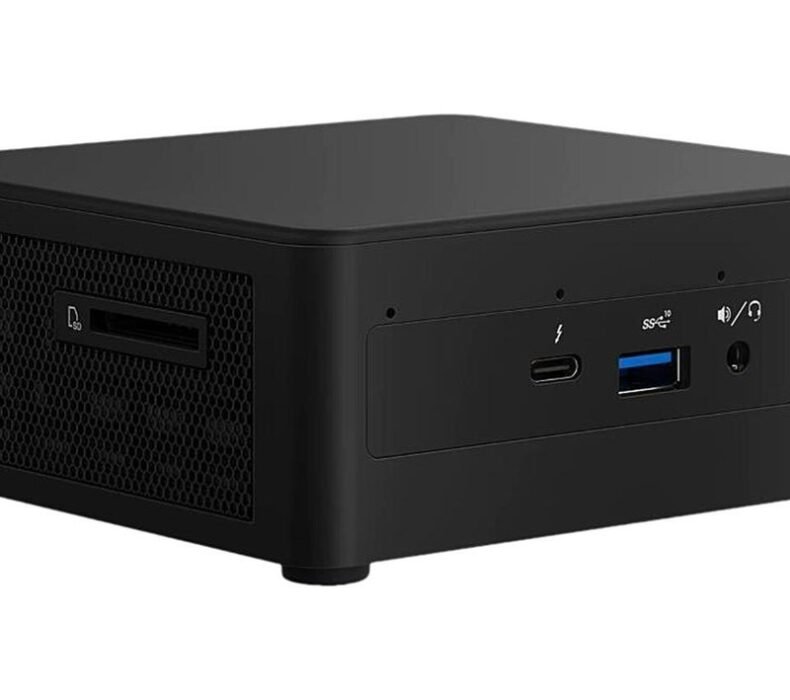
The Intel NUC 13 Pro is a fast mini PC, but it ships empty. Real cost lands near ฿18,000 once you add RAM, an SSD, and Windows. Best for: buyers who need Thunderbolt 4 and ASUS warranty. Skip if: you want a ready-to-run machine for less.
| Processor | Intel Core i5-1340P (13th Gen, 12c/16t, to 4.6GHz). |
| RAM | 2x SO-DIMM DDR4-3200, up to 64GB (user-installed). |
| Storage | M.2 2280 NVMe PCIe 4.0 (user-installed). |
| Graphics | Intel Iris Xe. |
| Connectivity | Thunderbolt 4, HDMI 2.0b, 2x USB-A 3.2, Wi-Fi 6E, BT 5.3. |
| Cinebench R23 (multi) | ~10,500 to 11,900. |
| Power | 120W external brick, 100-240V. |
| Warranty | 3-year (ASUS). |
Check Beelink mini PC current price
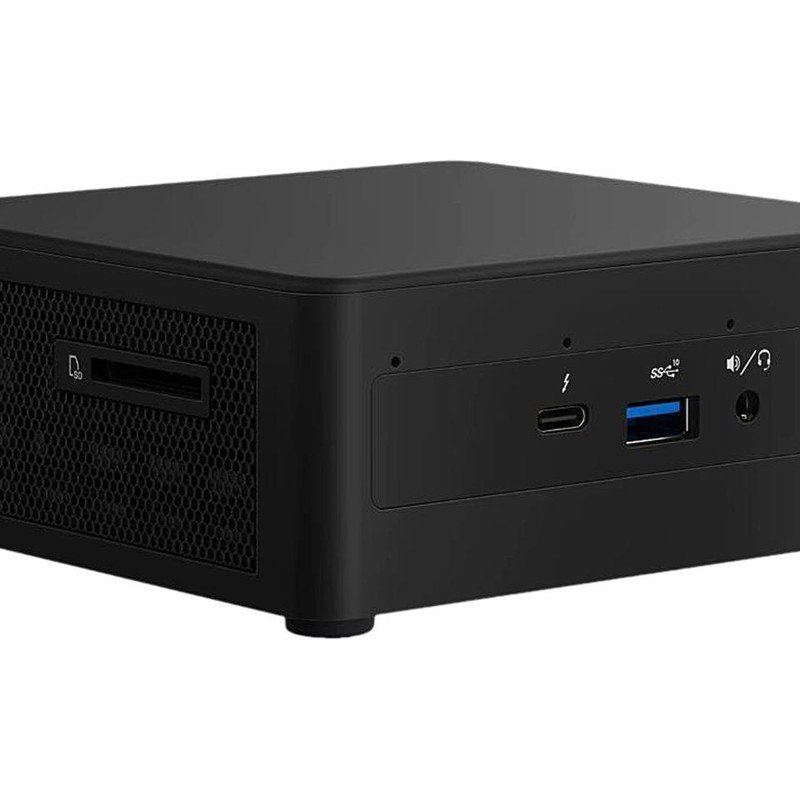
Is the NUC 13 Pro worth ฿17,000 once it’s actually running?
The number on the listing is not the price you pay. The NUC 13 Pro is sold barebone. No memory, no storage, no operating system. You get the unit, a 120W power brick, and a VESA plate. That’s it.
Here’s the math in baht. The i5-1340P barebone kit sits around ฿13,000 to ฿16,000 depending on seller. Two DDR4-3200 SO-DIMM sticks for dual channel run ฿1,200 to ฿1,800. An M.2 NVMe SSD adds ฿800 to ฿1,200 for 512GB. A Windows license is another ฿0 to ฿3,500 depending on how you source it. Built and booting, you’re looking at ฿16,000 to ฿19,000 for an i5 machine with 16GB and 512GB.
At that number the comparison stops being flattering. A configured Beelink with 16GB RAM and a 1TB SSD, Windows pre-installed, sells on major Thailand marketplaces for roughly ฿6,000 to ฿8,000. The NUC is faster and better built. It’s also two to three times the cost once you finish assembling it. That gap is the whole review.
What the money buys in build and ports
The chassis is plastic over a metal internal frame. The Tall version adds a 2.5-inch SATA bay below the M.2 slot. The bottom panel comes off with captive screws, so RAM and storage swaps take about three minutes with a single screwdriver. This is a serviceable unit, not a sealed one. That matters for a four-year keeper.
Port count is where the NUC pulls ahead of the budget field. Thunderbolt 4, HDMI 2.0b, two USB-A 3.2, Wi-Fi 6E, Bluetooth 5.3, and support for four displays at once. The Thunderbolt 4 port is the real differentiator. Configured Beelink and GMKtec boxes at half the price drop it. If you dock to an eGPU or a Thunderbolt monitor, that single port justifies a chunk of the premium on its own.
The 120W brick is rated 100-240V. On Thailand’s 220V grid it runs without a converter. The VESA plate mounts it behind a monitor, which is how most desk setups end up using it.
How fast is it in practice, and where does the heat win?
I have not personally tested this unit. This review draws on verified owner reports from Thailand buyers, Pantip and forum threads, and long-term reviews including measured benchmark and acoustic data from ServeTheHome and Thai hands-on coverage at Commart.
The i5-1340P is a 12-core hybrid chip, 4 performance cores and 8 efficiency cores, 16 threads. In Cinebench R23 it lands between 10,510 and 11,894 multi-core across the reviews, with single-core around 1,700 to 1,917. Single-thread is snappy, which is what you feel day to day. Office apps, VS Code, a wall of browser tabs, Zoom calls, light photo edits. The CPU never becomes the bottleneck in that work. On an NVMe SSD it boots in under 15 seconds.
Multi-core is where the spec sheet and the real world separate. The chip can sustain more than the box can cool. ServeTheHome measured the fan as very noticeable at peak load of 90 to 94W and again at steady-state of 59 to 63W. It’s only silent at idle, between 4.5 and 8W. The small case restricts airflow and limits how big the heatsink can be. So the NUC makes a choice: throttle the chip, or spin the fan hard. Under sustained all-core load, it spins the fan hard. Owners on forums describe it as a jet engine on the desk.
Now put that in a Thai room. In a 30°C ambient bedroom with no aircon, which is normal here for most of the year, the thermal headroom shrinks. Light work stays quiet. The moment you compile a large project, render video, or run a long export, the fan climbs and stays there. Air conditioning isn’t required for the NUC to function, but it’s the difference between a quiet desk and a loud one during heavy sessions.
There’s a longer tension owners flag. Earlier NUC fans degrade over time. Several long-term owners report the fan getting louder across a year or two, and in worst cases the unit overheating and shutting down. Fan replacement is the most common repair across this whole 4×4 mini PC class. The cooling is the part to watch, not the CPU.
For graphics, the Iris Xe handles 4K video playback cleanly and runs older esports titles at 720p low. Thai hands-on testing put Genshin Impact at 30 to 40 fps on Low. That’s the ceiling. This is not a gaming PC, and no firmware update changes that. If you want frames, you want a box with a discrete GPU or a real desktop. Our best mini PCs for Thailand roundup covers the configured options that ship ready to run.
How does it stack up against configured mini PC alternatives?
Three names come up every time someone asks for a NUC alternative in Thailand, and all three are widely sold in Thailand.
The configured Beelink mini PC is the value pick. 16GB RAM, 1TB SSD, Windows installed, around ฿6,000 to ฿8,000, local warranty. It’s slower than the i5-1340P and drops Thunderbolt 4. For a student writing papers, a remote worker on Microsoft 365, or a basic home server, you will not feel the difference in daily use, and it boots the day it arrives. The Minisforum UM760 with a Ryzen 5 7640HS is the performance-per-baht pick if you want DDR5 and an open BIOS for fan-curve tuning. The GMKtec N100 and N150 boxes go cheaper still for an HTPC or a light always-on machine, but their support is hit-or-miss and you troubleshoot yourself.
The honest position: the NUC wins on Thunderbolt 4, build quality, the quietest profile at light load, and the 3-year ASUS warranty after Intel handed the line over. It loses on total cost and out-of-box readiness. If the warranty and the Thunderbolt port aren’t load-bearing for you, a configured box does the same job for less.
One note on buying. Because the genuine NUC barebone is not always available through commissionable listings, the CTA below points at a configured Beelink mini PC with local warranty, which is the ready-to-run alternative this review recommends for most buyers. Verify the exact spec and local warranty before you order.
- i5-1340P scores 10,500 to 11,900 in Cinebench R23 multi-core, fast for this size.
- Thunderbolt 4 plus Wi-Fi 6E and four-display output, which the cheaper configured boxes drop.
- Bottom panel off in one screw, RAM and SSD swapped in about three minutes.
- 3-year ASUS warranty after the Intel handover, real service centers in Bangkok.
- 120W brick rated 100-240V, runs on Thailand’s 220V grid with no converter.
- Barebone: real total cost hits ฿16,000 to ฿19,000 once RAM, SSD, and Windows are added.
- Fan is loud at 59 to 94W load, and owners report it degrading over a year or two.
- Iris Xe caps at 30 to 40 fps on Genshin Low, a configured Beelink runs ฿6,000 to ฿8,000 ready to use.
Check Beelink mini PC current price
Should you buy the NUC 13 Pro in Thailand?
Buy it if three things are true. You already own a monitor and keyboard. You need Thunderbolt 4 or four-display output. You want the 3-year warranty and you’re keeping the machine four to five years. For a remote worker who docks between Bangkok and Chiang Mai, or a coding student who wants a real Windows desktop instead of a Chromebook, the i5-1340P is genuinely fast and the build outlasts a budget box.
Skip it if you want value or convenience. The barebone total cost erases the price advantage over a configured Beelink, and that box arrives ready to use. Skip it for gaming, because Iris Xe tops out at 30 to 40 fps on the easy stuff. And factor the fan into your room: in a non-aircon Thai bedroom, sustained loads turn it loud. If you’re building rather than buying ready-made, the best PC components in Thailand guide covers the RAM and SSD you’ll need to add.
Frequently Asked Questions

Karn is ElectroThailand's lead gaming and computing editor. He covers gaming PCs, GPUs, CPUs, gaming peripherals, and everything in the PC building and esports space. With years of competitive gaming experience and a deep understanding of hardware benchmarks, Karn helps Thai gamers build smarter rigs without overspending.