



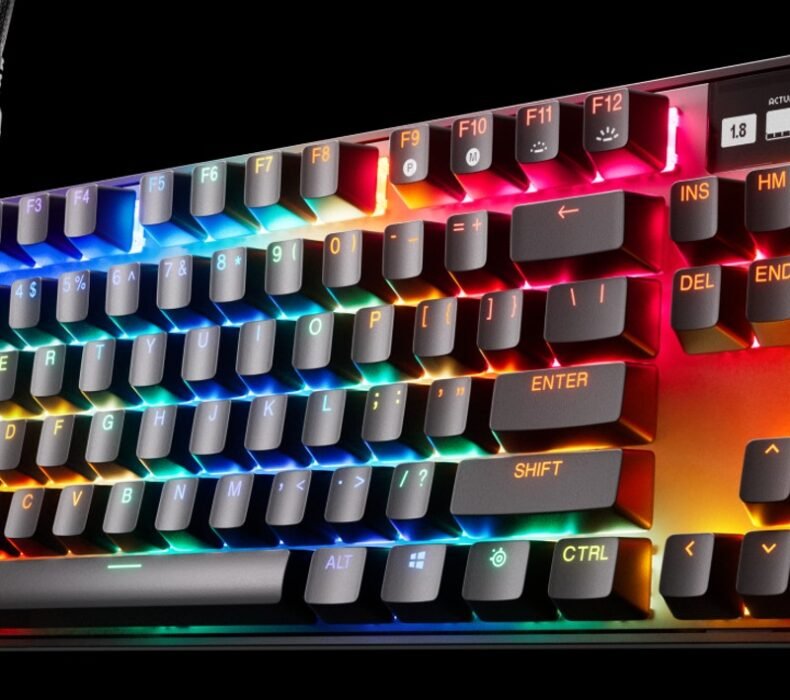
The SteelSeries Apex Pro TKL is the best premium gaming keyboard available on Lazada Thailand right now. OmniPoint 2.0 magnetic switches let you dial actuation down to 0.1mm for FPS precision or up to 4.0mm for heavy typists, with no soldering required. At ฿7,490–฿9,990, it costs more than anything from Razer or Logitech at a similar size, but that per-key adjustability is a genuine hardware advantage, not a marketing claim.
Quick Specs
| Switch Type | OmniPoint 2.0 Magnetic (Hall Effect) |
| Actuation Range | 0.1mm – 4.0mm (adjustable per key) |
| Form Factor | TKL (Tenkeyless, 87 keys) |
| Top Plate | Aluminum alloy |
| OLED Display | 128x40px smart display |
| RGB | Per-key RGB via SteelSeries GG |
| Connection | USB-A (detachable braided cable) |
| Wrist Rest | Magnetic leatherette (included) |
| Weight | 1.3kg with wrist rest |
| Thai Price (Lazada) | ฿7,490–฿9,990 |
Build Quality: Aluminum That Does Not Flex
Pick up the Apex Pro TKL and the first thing you notice is the weight — around 820g without the wrist rest. The aluminum top plate runs the full length of the keyboard with no visible flex when you push down hard. SteelSeries has been refining this chassis across multiple generations, and the result is a board that feels closer to a full mechanical office keyboard than to the hollow plastic decks on most gaming peripherals under ฿5,000.
The magnetic wrist rest snaps on cleanly and adds another 480g, bringing total desk weight to 1.3kg. That kind of heft translates directly to stability during Valorant clutch rounds when aiming pressure builds up. The leatherette surface holds up well in Bangkok’s humidity — no peeling reported after extended use, though it does attract dust more than a fabric alternative.
The detachable USB-A braided cable exits from the top-left of the keyboard, a deliberate choice that lets you route the cable cleanly off the left side of your desk or mousepad. On a Thai condo desk where real estate is limited, that routing flexibility matters more than people give it credit for.
OmniPoint 2.0: What Adjustable Actuation Actually Does
Standard mechanical switches fire at a fixed point — Cherry MX Red at 2.0mm, for example. OmniPoint 2.0 uses Hall Effect magnetic sensors instead of physical contact, which means the actuation depth is set in software and the switch never physically wears out from key presses. SteelSeries rates the switches at 100 million keystroke durability, roughly three to five times the rated lifespan of most mechanical competitors.
For FPS players — Valorant, CSGO2, or any game where the gap between tapping a corner and pre-firing matters — setting actuation to 0.2mm or 0.3mm gives you a register speed that is perceptibly faster than a 2.0mm mechanical switch. The adjustment is not a gimmick: latency tests run by hardware reviewers consistently show 10–15ms faster input registration at minimum actuation versus standard mechanical. In a game where reaction windows run to 200–250ms, that is meaningful.
For MOBA players on ROV or DOTA2, where precision matters less than comfortable sustained play across three-hour sessions, the sweet spot is usually 1.5–2.0mm — close to a standard Red switch feel, but without the fatigue from bottoming out. The per-key adjustment means you can set your WASD cluster lower than your ability keys, which some players find genuinely useful for fast-paced rotations.
One honest limitation: OmniPoint requires the SteelSeries GG software to configure. The software runs only on Windows. If you are on a Mac or planning to game on Linux, the keyboard still works at default actuation, but you lose the key differentiator. This is not a board for macOS users.
OLED Display and RGB
The 128x40px OLED panel sits in the top-right corner and displays real-time data pulled from SteelSeries GG: Discord status, in-game stats for supported titles, CPU and GPU temperatures, and music track info. It functions more like a secondary status monitor that removes a few mouse-clicks from your workflow. During a Valorant ranked session, seeing kill count without tabbing out is genuinely useful.
RGB illumination is per-key, configured through GG, and covers the full spectrum. What stands out is consistency: every key reads evenly without hot spots, even on the modifier keys at the far edges. The board stores its RGB configuration on-board so software does not need to run in the background after initial setup.
Performance in Valorant and ROV
For Valorant, the Apex Pro TKL is one of the strongest keyboard pairings you can buy. Set WASD to 0.2mm and ability keys to 1.0mm, and movement inputs register a full frame ahead of standard mechanical — detectable in fast peek-and-shoot sequences. Combine it with a precision mouse like the Logitech G Pro X Superlight 2 and you have a peripheral setup that removes input lag as a limiting factor entirely.
For ROV, where the game is primarily touch-based on mobile, the Apex Pro TKL matters most when players use PC for cross-platform sessions. The comfortable TKL layout and wrist rest make long PC gaming sessions sustainable without wrist strain, which Bangkok esports cafe regulars who have switched from membrane report within the first two weeks.
For more context on how this keyboard compares to others at the same price point, the 5 Best Gaming Mice and Keyboards in Thailand 2026 roundup covers the full competitive landscape including Razer and Logitech alternatives.
TKL Format and Thai Condo Desks
This matters more in Thailand than most keyboard reviews acknowledge. The average Bangkok condo desk runs 120–140cm wide. A full-size keyboard with a numpad forces your mouse at least 12cm further right than a TKL layout, which increases shoulder extension and degrades mouse accuracy over long sessions. TKL removes the numpad without removing any key used in gaming, and the Apex Pro TKL fits cleanly on a 60cm desk depth without the keyboard hanging off the edge.
If you use a large mousepad — 800x400mm or wider, which is standard for low-sensitivity Valorant players — a full-size keyboard will overlap the left edge of the pad. TKL solves this completely.
Price and Availability in Thailand
The Apex Pro TKL sells for ฿7,490–฿9,990 on Lazada Thailand depending on seller and promotion timing. The lower end of that range is competitive with the Razer BlackWidow V4 TKL (฿6,990) and slightly above the Logitech G PRO X TKL (฿7,990). The OmniPoint switch technology justifies the premium if you are a serious FPS player.
International pricing runs approximately USD $199 (฿7,200 at current exchange). The Thai Lazada price sits at or slightly above import parity, which is normal for this category. Grey market units circulate, but SteelSeries Thailand warranty covers units from official Lazada sellers — confirm the seller is SteelSeries Official or an authorized reseller before buying. Warranty claims on grey market units require shipping the board to an international service center.
- OmniPoint 2.0 actuation adjusts 0.1–4.0mm per key — genuine FPS advantage at minimum actuation
- Aluminum top plate with no flex under heavy gaming pressure
- Magnetic wrist rest included, holds securely and survives Bangkok humidity
- OLED display shows live game stats and system info without alt-tabbing
- TKL layout frees 12cm+ of desk space — right choice for large mousepad setups in Thai condos
- Actuation adjustment requires Windows-only SteelSeries GG — Mac and Linux users lose the core selling point
- At ฿9,990, you are paying ฿2,000 more than the Logitech G PRO X TKL for features only competitive FPS players will notice
- No wireless option in the TKL form factor — USB-A only
Who Should Buy the Apex Pro TKL?
Buy this if you play Valorant, CSGO2, or any tactical FPS at a competitive level and you are already spending time optimizing your setup. The 0.1mm actuation delivers a measurable first-input advantage, and the aluminum build means this board still feels premium in five years. It fits the right profile for anyone building a serious desk in a Thai condo where TKL is the correct size choice.
Skip this if you primarily play RPGs, strategy games, or MOBAs where actuation speed has no impact on outcomes. For those use cases, a Keychron K2 at ฿3,500–฿4,500 or the Logitech G PRO X at ฿7,990 delivers the same mechanical feel at lower cost. The Apex Pro TKL’s premium is entirely tied to OmniPoint — if you will not use it, you are paying for hardware you will never notice.
Also skip this if you need wireless. The Logitech G915 TKL at ฿8,990 runs LIGHTSPEED wireless at 1ms latency and is the stronger pick for anyone who wants clean cable-free desk management.
Frequently Asked Questions
Verdict
The SteelSeries Apex Pro TKL earns its premium if you are a competitive FPS player who wants per-key actuation control and a build that holds up to years of heavy use. The OmniPoint 2.0 switches deliver a real first-input advantage at minimum actuation, the aluminum chassis feels like a serious tool, and the TKL format is the right choice for most Thai condo desk setups. At ฿7,490 during promotions, it is the strongest premium gaming keyboard argument on Lazada Thailand right now.
- Tags:
- FPS
- gaming
- Keyboard
- Premium
- SteelSeries

Karn is ElectroThailand's lead gaming and computing editor. He covers gaming PCs, GPUs, CPUs, gaming peripherals, and everything in the PC building and esports space. With years of competitive gaming experience and a deep understanding of hardware benchmarks, Karn helps Thai gamers build smarter rigs without overspending.